Dashboard overview
Here you can see the key performance indicators of your account: engagement rate, user activity, and total interactions. This is where you can quickly check your overall progress, how many likes, follows, story views, and unfollows the system performed. You can also choose the period you want to analyze, a week, a month, or a year, depending on how long your account has been promoted in our system.
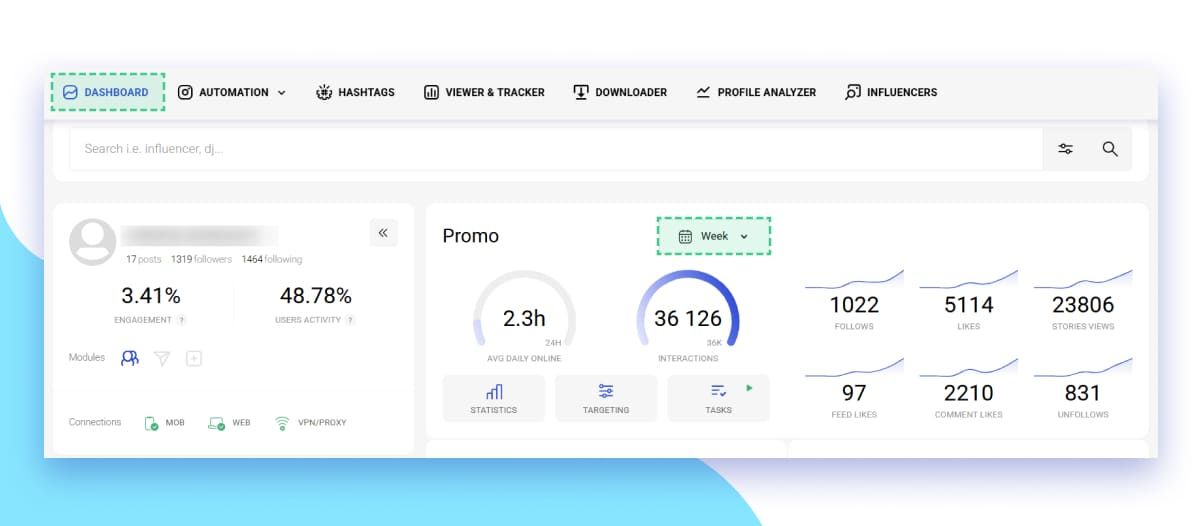
These numbers give you a quick snapshot of your account’s growth. If you notice stable engagement and steady interaction numbers, it means your promotion settings are working correctly.
Promo Module statistics
To get a more detailed view, open your account in the Promo section and click on the Statistics tab. Here you’ll find graphs showing the number of likes, comments, follows, unfollows, new followers, and story views per day.
Our system begins to work gradually, so at first, the promotion may seem slow. Over time, the speed and volume of actions increase, ensuring safe and steady growth for your account.
You can choose a time period, last week, last month, last 2 months, or last year, to track your performance in detail.
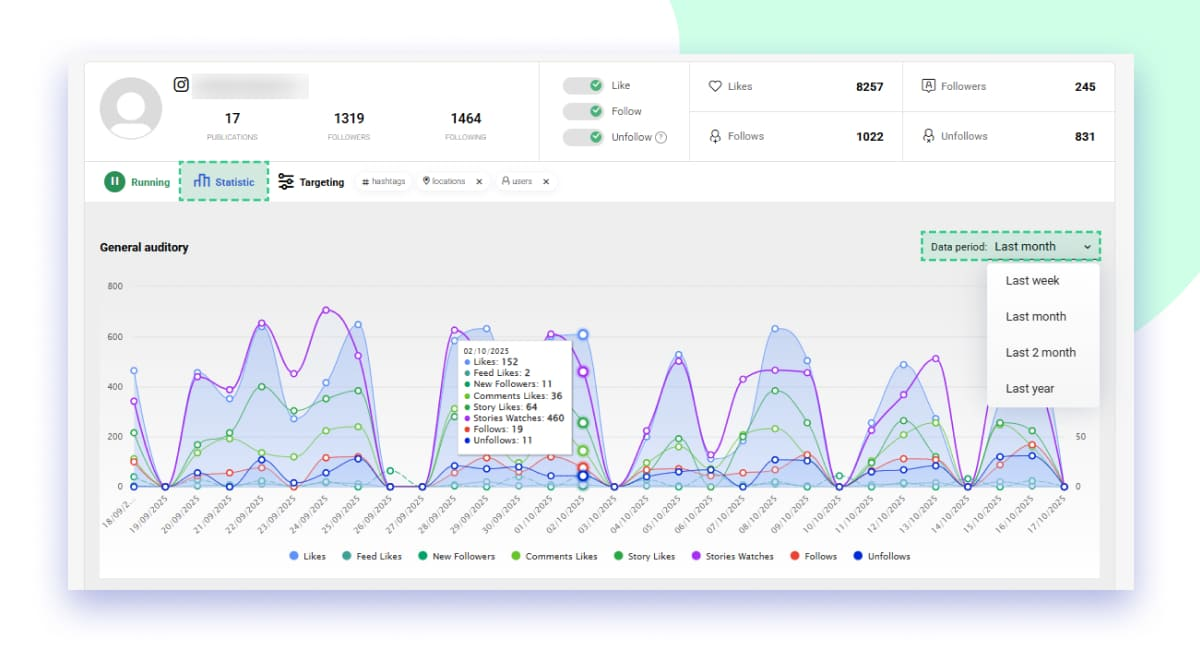 This section helps you see when your promotion was most active and which days brought the best results. For example, if you notice peaks on certain days, you can analyze what kind of targets were active at that moment and repeat similar settings in the future.
Statistics by targets (Hashtags, Locations, Usernames)
Each type of target works independently and has its own statistics. You can open each tab Hashtags, Locations, or Usernames to see how many new followers, likes, or actions came from each target. All of them are divided into Efficiency, New followers, Likes, Comments, Follows, and Stories watched. The key metric here is Efficiency, which shows the ratio of new followers to the number of actions performed.
For example, if you liked 100 posts under one hashtag and got 2 new followers, the hashtag’s efficiency is 2%. Anything above 1% is a good result. If the number is lower, it’s better to replace that target with something new.
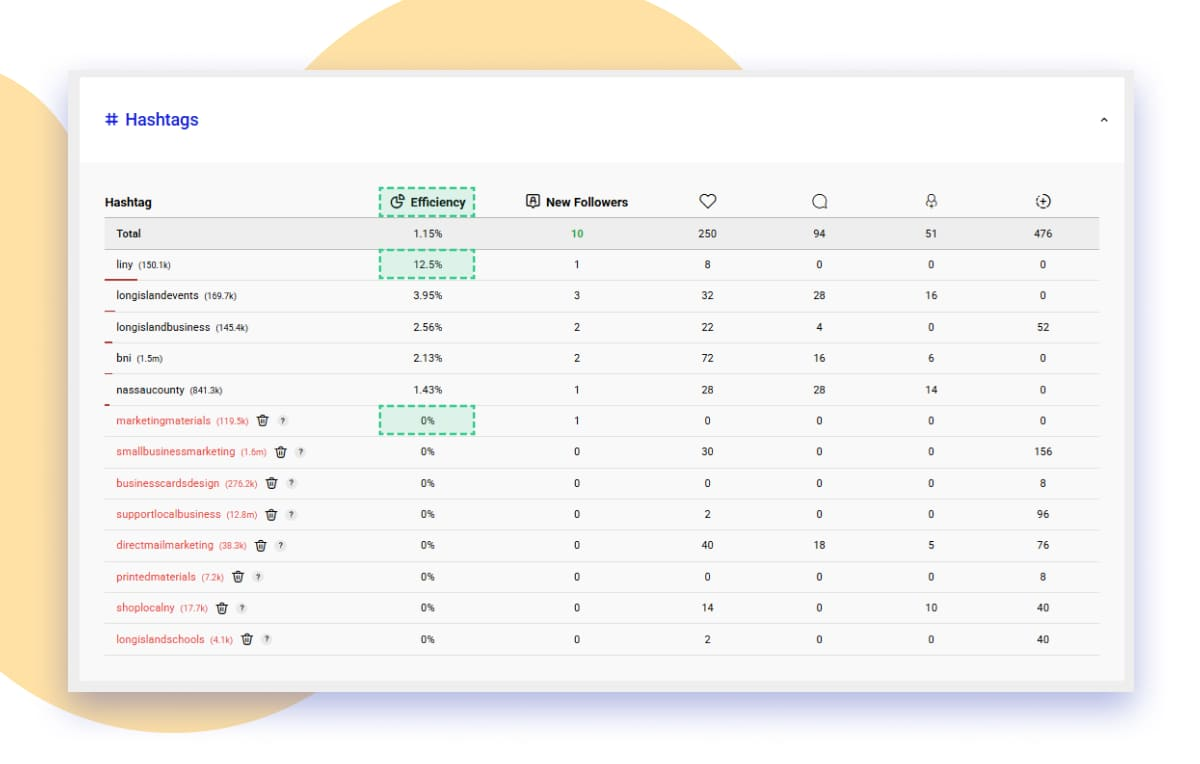 Efficiency helps you understand which hashtags, locations, or usernames bring real followers. This is why it’s important to review your statistics every week and update your targets.
By tracking and analyzing your statistics regularly, you’ll quickly see what works best and optimize your promotion for higher engagement and faster growth. To keep your promotion effective, check your statistics every week and update the hashtags, locations, and usernames that have less than 1% efficiency.
FAQ
- Why can’t I see statistics for some of my targets yet?
If the statistics for a certain target are not showing yet, it means the system hasn’t performed actions for that target. Once it does, the data will appear automatically. - Why do some of my targets attract users from other countries?
Each target, hashtags, locations, usernames, works independently. Sometimes hashtags or usernames may attract users from different countries, which is completely normal. The system distributes activity across regions to keep your account safe and avoid suspicious behavior on Instagram. - Why are some usernames getting more interactions than others?
The system performs actions in a random and natural way, just like real user behavior. That’s why some usernames might receive slightly more interactions, while others get a bit less, this makes the activity look authentic to Instagram’s algorithm.